Last updated:
Skip free email domains in your CRM
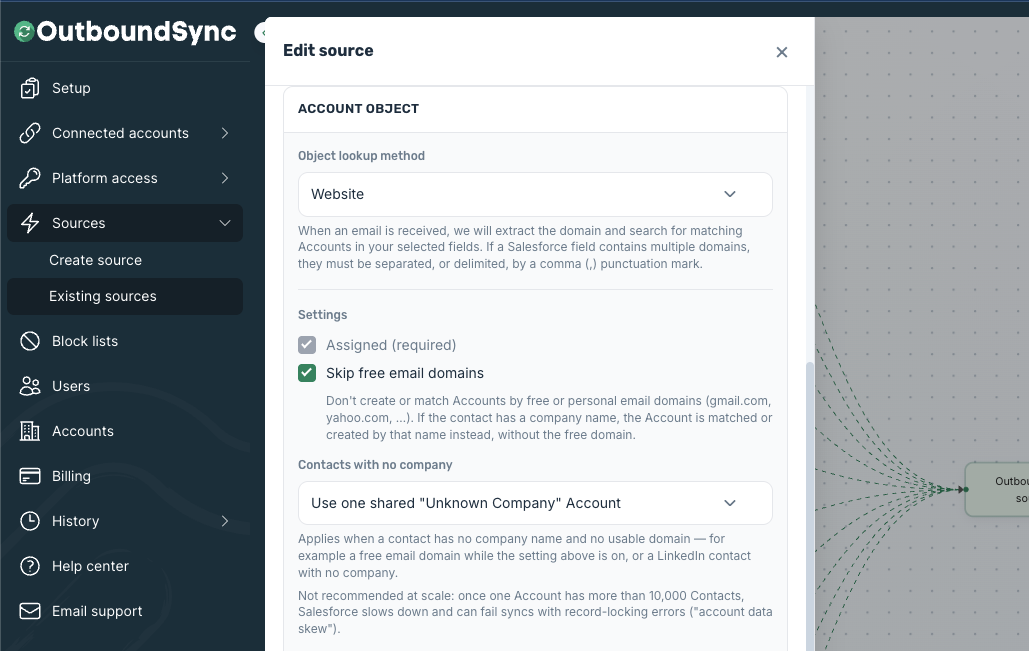
OutboundSync can now skip free and personal email domains when it matches or creates a company in your CRM. Gmail, Yahoo, AOL, and more than 4,700 other free email providers no longer turn into junk company records.
If you’ve ever opened HubSpot or Salesforce and found a “Gmail” company with 300 unrelated contacts attached to it, this one’s for you.
Using HubSpot or Salesforce with an existing OutboundSync connection? Log in and turn this on for each sync. It’s off for existing HubSpot and Salesforce syncs until you enable it.
How it works
When Skip free email domains is on, OutboundSync never creates or matches a company from a free email domain. Instead:
- We try the company website first, if your sequencer sent one.
- Then we check the company name, if one was provided.
- If neither works, the contact still syncs without a company, and your sync history explains why.
Your contacts and activity keep flowing either way. You just stop getting fake companies.
The exclusion list covers 4,748 free and personal domains. We built it from HubSpot’s published free email domain list plus a few curated additions, and we vetted it so companies that also run free email services, like Google, aren’t blocked for contacts who actually work there.
Available now
Skip free email domains works with HubSpot, Salesforce, Close, and Attio.
- New CRM connections start with it on by default.
- Existing Close and Attio connections already have it on.
- Existing HubSpot and Salesforce connections stay off until you turn it on.
How to turn it on for existing HubSpot and Salesforce syncs
Open your sources in OutboundSync. Find Skip free email domains under the company settings and enable it. Save and update your source, and it takes effect right away.
Salesforce users also get a Contacts with no company option: Dedicated, Don’t create, or Shared.
Turning it on stops new free-domain companies from being created. It doesn’t delete free-domain companies already in your CRM, so you may want to clean those up separately.
For API users
The setting is visible read-only on GET /api/v1/sources as config.excludeFreeEmailDomains. Salesforce sources also show config.salesforceNoCompanyAccount. You change the setting in the OutboundSync app.
The OutboundSync API is out now. List syncs, destinations, and more. It works great with Claude, Grok Bot, and other agent tools.
Questions? Get in touch and we’ll help you set it up.

Founder & President, OutboundSync
15+ years in B2B sales and operations. Former HubSpot Solutions Partner and Smartlead expert. Built the agency that became OutboundSync.
Similar posts
Use Smartlead Manual Step events in your CRM
OutboundSync now supports Smartlead's Manual Step Reached event. When a prospect reaches a manual step in a campaign, OutboundSync writes it to your CRM.
Harris Kenny
OutboundSync MCP 0.4.0 and Agent Skills update
OutboundSync MCP 0.4.0 labels which tools change data and returns clearer errors. Agent Skills now share one status layout and match the live API and MCP.
Harris Kenny
OutboundSync webhooks are live
OutboundSync now POSTs sync.failed and sync.recovered to your HTTPS endpoint — Slack, PagerDuty, n8n, Zapier, Clay — so you know when CRM sync breaks.
Harris Kenny