HubSpot outbound integration and orchestration
Every outbound send, reply, and unsubscribe—logged on the right contact, routed to the right rep, and visible in your HubSpot reports. Across email, social, and phone.
Trusted by leading HubSpot GTM teams
 David
David  Stord
Stord  Freckle
  Factorial
  Cerby
Cerby  Hygraph
 Connect outbound platforms to HubSpot with full control
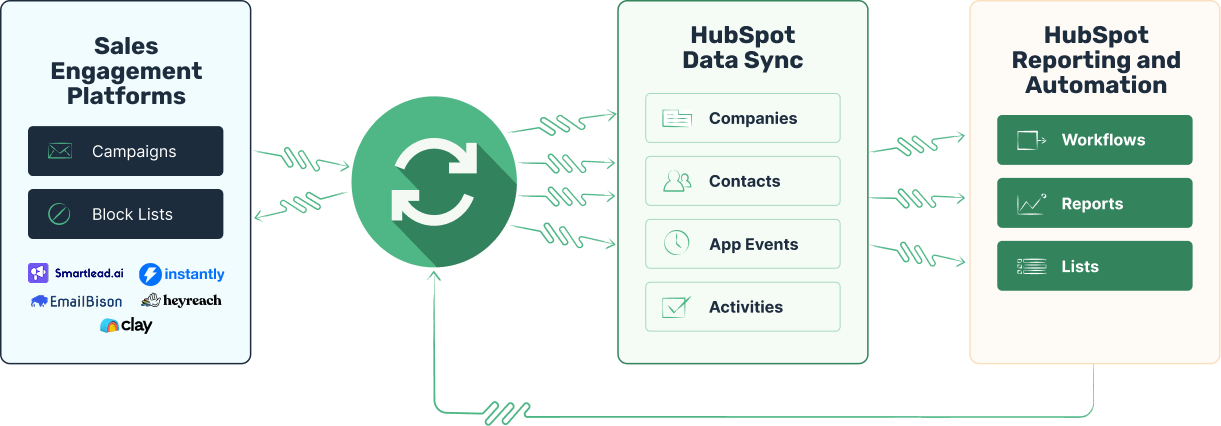
Run outbound from HubSpot with complete visibility
Outbound activity shows up in HubSpot like it was sent from HubSpot. Over 100 supported properties, native timeline events, and full workflow compatibility.
Revenue attribution
Know exactly which deals were created, or influenced, by your outbound campaign efforts.
Lead routing
Get the right leads directed to the right people. Handle replies directly in your HubSpot portal.
Timeline events
Log every email sent, reply, open, click, unsubscribe, and even category update—at the contact-level.
Contact properties
Take advantage of over 20 custom contact properties in your lists, workflows, and notifications.
Block lists
Block email addresses or entire domains—just off of a list in HubSpot. No more CSV exports.
Account-based selling
Associate emails with both contacts and companies to track campaigns at the company-level.
Native reporting
Create your own reports and dashboards in HubSpot to monitor your outbound results.
Custom alerts
Decide when and how to alert your sales reps. Send emails, create tasks, Slack messages, and more.
Handle the inbox
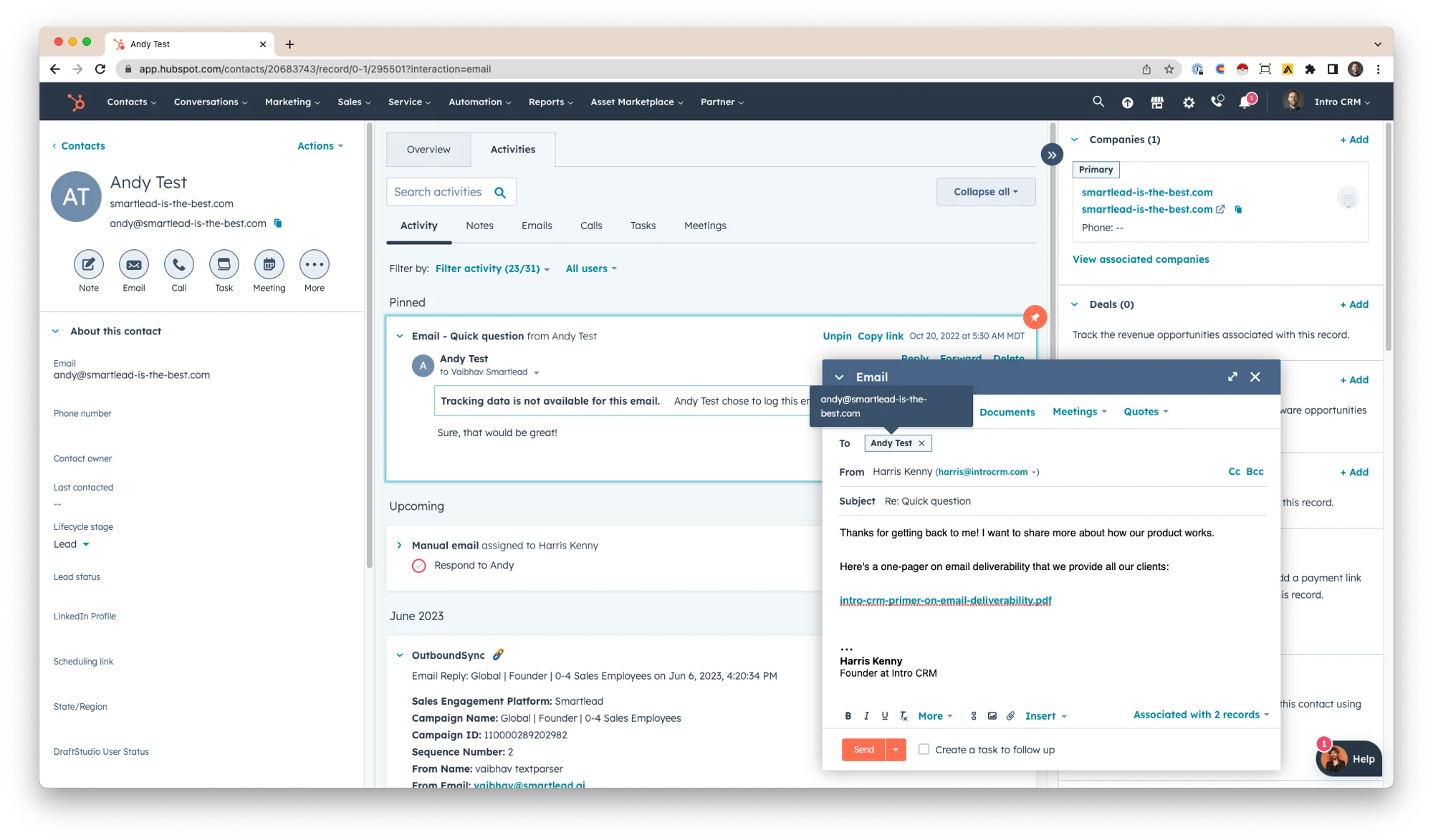
Review and reply in one place
Every conversation lives on the contact record. Reply to logged emails directly, use templates, book a meeting, and close the deal—without switching tools.
Automate your work
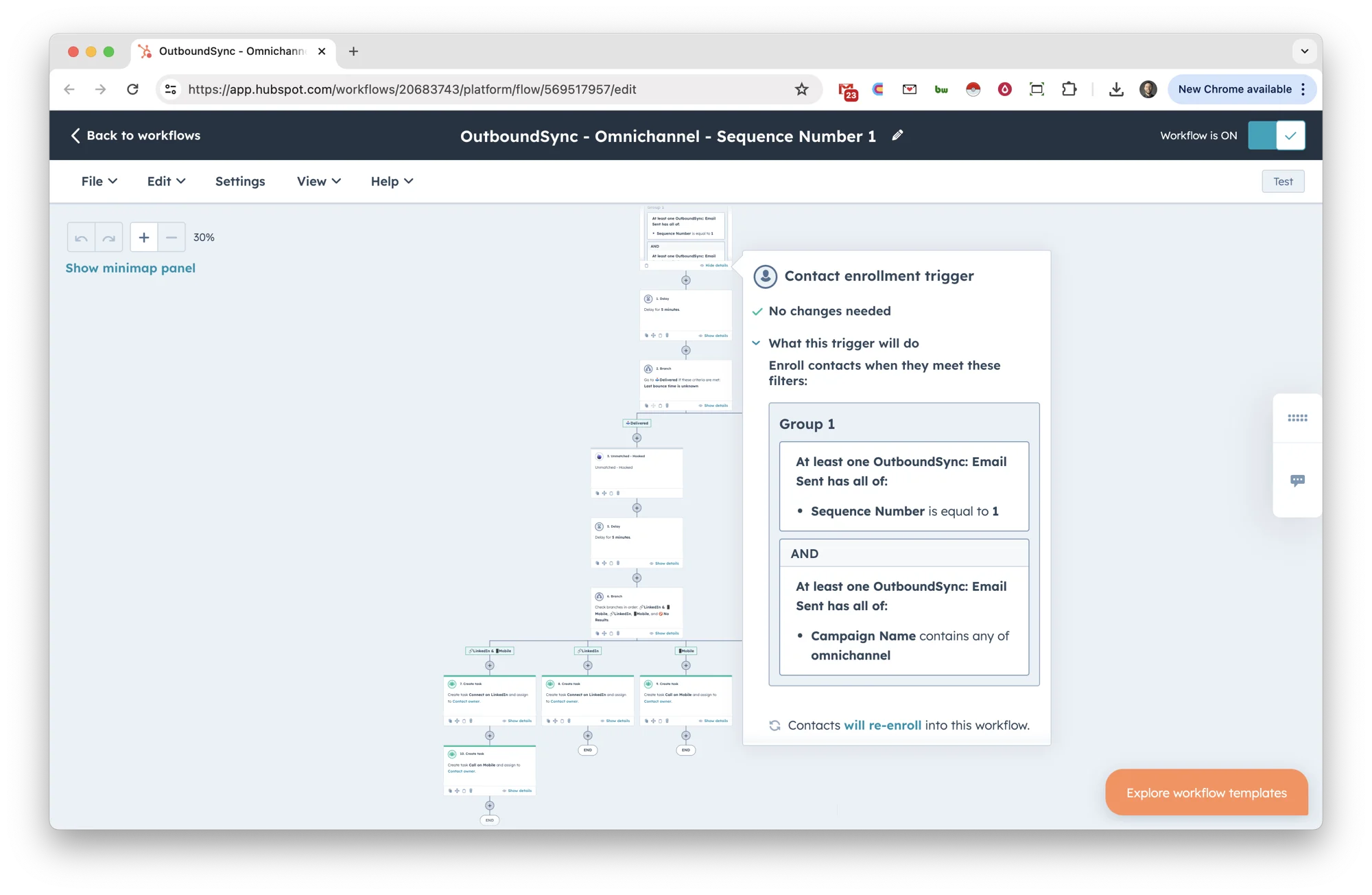
Create advanced workflows
Trigger workflows from outbound activity—update properties, rotate owners, send notifications, and enrich contacts with tools like Clearbit and Clay. Then go omnichannel from HubSpot by phone or social.
Manage your lists
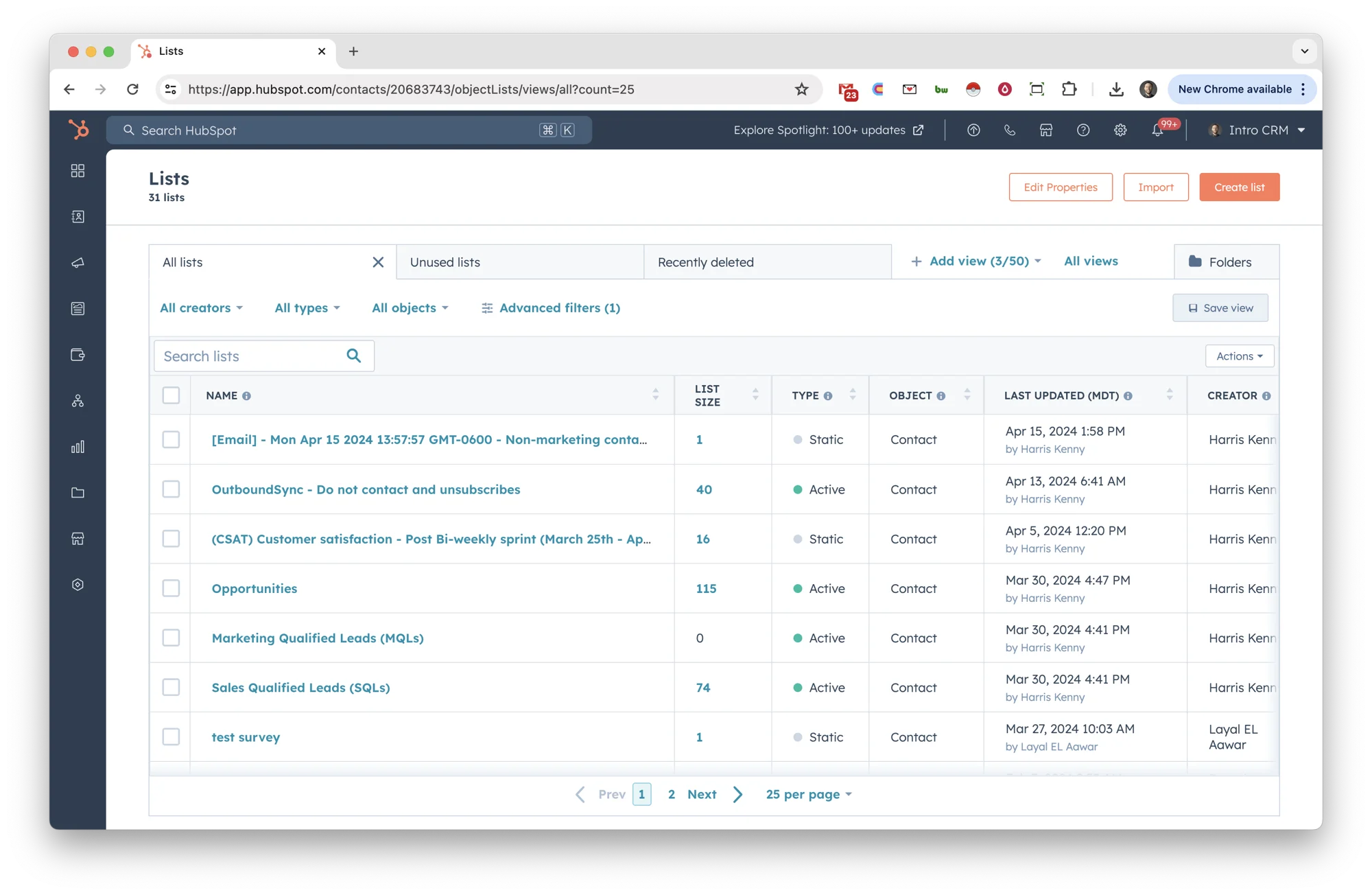
Turn HubSpot lists into block lists
Never contact the wrong people. Build a list in HubSpot, and OutboundSync keeps your outbound platforms in sync—including domain-level blocks so nobody at a company gets cold outreach.
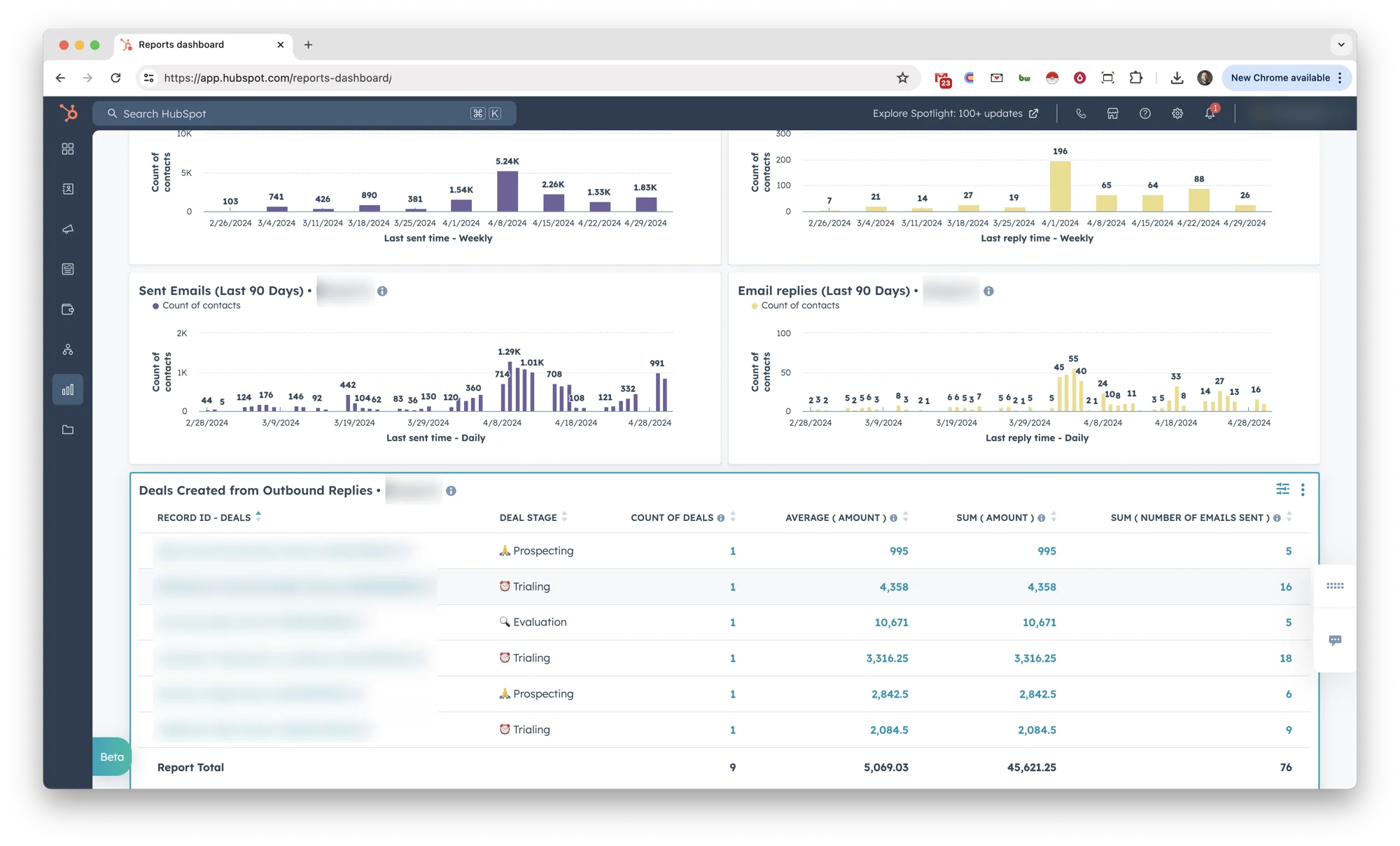
See what's happening
Build native reports and dashboards
See outbound results without leaving HubSpot. Build dashboards to track sending volume, replies, opens, and more—daily, weekly, or monthly.
Deciding which HubSpot tier you need
OutboundSync does not have any feature-gating; it works across all HubSpot plans. But specific HubSpot plans are required to unlock features in HubSpot. Here's which HubSpot features are compatible with OutboundSync, by tier.
Free
Reply and CRM management for up to 1,000 contacts.
- Associate activities and app events
- Block contacts and companies via lists
- Standardize data and reply handling
Starter
CRM hygiene with minimal automation, no reporting.
- Associate activities and app events
- Block contacts and companies via lists
- Standardize data and reply handling
- Basic automation and increased core functionality
Most popular
Professional
Scaling CRM full automation, light reporting.
- Associate activities and app events
- Block contacts and companies via lists
- Standardize data and reply handling
- Trigger workflows, tasks, assignment, enrichment
- Attribution outbound to meetings and deals with custom reports
Enterprise
All-in-one CRM system of record and system of action.
- Associate activities and app events
- Block contacts and companies via lists
- Standardize data and reply handling
- Trigger workflows, tasks, assignment, enrichment
- Attribution outbound to meetings and deals with custom reports
- Customer journey analytics, predictive scoring, and multi-touch revenue tracking
- Governance and permissions controls
Certified and trusted

HubSpot integration FAQ
-
What data does OutboundSync write to HubSpot?
OutboundSync writes outbound activity like sends, replies, opens, clicks, bounces, and status updates to HubSpot records so teams can run workflows, reporting, and attribution. -
Can we control block lists from HubSpot?
Yes. Build and maintain lists in HubSpot, then use OutboundSync to push those exclusions to your connected outbound platform to prevent unwanted outreach. -
Does this require Zapier, Make, or custom middleware?
No. OutboundSync provides a dedicated HubSpot integration flow so teams can connect tools and sync structured data without maintaining custom middleware. -
Does OutboundSync replace HubSpot Sequences?
No. OutboundSync complements HubSpot by syncing activity from outbound platforms used for scaled net-new outreach into HubSpot as your system of record. -
Which HubSpot plans are supported?
OutboundSync works across HubSpot plans. Advanced automation and reporting outcomes depend on the HubSpot features available in your plan tier.